Setting up a voice-controlled smart home can seem daunting, especially for those on a budget. With the right approach, it can be both affordable and straightforward. By selecting a few key devices and utilizing compatible platforms, one can create a functional and efficient smart home without breaking the bank.
Affordable smart speakers and budget-friendly devices can easily integrate to form a cohesive system. Brands offer various options that connect with virtual assistants, allowing users to control lighting, temperature, and security with simple voice commands. Embracing these technologies not only enhances convenience but also promotes energy efficiency and safety at home.
Navigating the world of smart home gadgets requires some research, but with careful planning, anyone can prioritize cost-effective solutions. This article will outline essential tips and recommendations to guide readers in building their own voice-controlled smart home while staying within budget constraints.
Choosing Your Smart Home Ecosystem
Selecting the right smart home ecosystem is crucial for budget-conscious consumers. Key considerations include understanding platform differences, choosing between popular voice assistants, and ensuring device compatibility with existing technology.
Understanding Smart Home Platforms
Smart home platforms act as the backbone of connected devices. They determine how devices communicate and integrate with each other. Key platforms include Google Assistant, Amazon Alexa, and Apple HomeKit.
Factors to consider include:
- Ecosystem Compatibility: Some devices work best within their native ecosystems.
- User Interface: The ease of use can vary widely between platforms.
- Automation Capabilities: Options for setting routines and automating tasks differ significantly.
Choosing a platform that aligns with these factors can enhance user experience while keeping costs manageable.
Google Assistant vs. Amazon Alexa for Budget Setups
Both Google Assistant and Amazon Alexa offer robust features for budget smart homes. Google Assistant excels in search capabilities and integrates well with Google services.
Key points:
- Voice Recognition: Both platforms have impressive recognition, but Alexa is known for faster responses.
- Device Availability: Amazon Alexa supports a wider range of third-party products.
- Price Range: Google devices often provide more affordable options, which can be appealing on a budget.
Ultimately, which assistant to choose depends on personal preference and specific device requirements.
Ensuring Device Compatibility
Compatibility is a significant factor when setting up a smart home. Devices must work seamlessly within the chosen ecosystem to avoid frustration.
Tips for ensuring compatibility include:
- Research Compatible Brands: Each ecosystem has preferred brands. For example, Philips Hue works well with both Google Assistant and Alexa.
- Check Certification: Look for “Works with Google Assistant” or “Works with Alexa” labels.
- Read User Reviews: These can provide insights into real-world integration experiences.
Choosing compatible devices can simplify setup and enhance the functionality of a smart home on a budget.
Essential Devices for a Voice-Controlled Smart Home
A variety of essential devices can create a practical and budget-friendly voice-controlled smart home. The right mix enhances convenience, energy efficiency, and home security, making everyday tasks simpler. Key categories include smart speakers, lighting solutions, thermostats, and smart plugs.
Smart Speakers and Voice Assistants
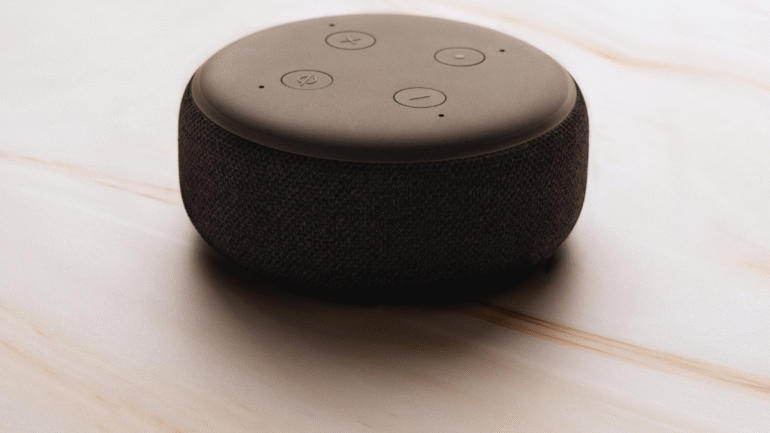
Smart speakers serve as the central hub for a voice-controlled smart home. Popular models include the Amazon Echo and Google Nest Audio. These devices integrate voice assistants like Amazon Alexa and Google Assistant, enabling voice commands for various smart home devices.
Most models range from $50 to $100, making them accessible. They allow users to play music, check the weather, and control other devices with ease. Many also support third-party applications, enhancing their functionality.
Affordable Smart Lighting Options
Smart lighting offers a simple upgrade to enhance the home environment. Budget-friendly options include Philips Hue and Wyze Bulbs. These solutions allow for voice command control via Amazon Alexa or Google Assistant.
Users can change colors, dim lights, and set schedules. Basic smart bulbs typically range from $15 to $30. Additionally, smart lighting can improve security by giving the impression that someone is home, even when they’re not.
Budget-Friendly Smart Thermostats
Smart thermostats enable better climate control and energy savings. Models like the Nest Thermostat E and Ecobee Lite offer features at lower prices. These devices can be integrated with voice assistants to adjust temperature settings hands-free.
Prices for budget thermostats usually fall between $80 and $150. They optimize energy use and provide usage reports. This capability helps users save on energy bills while maintaining comfort.
Selecting Cost-Effective Smart Plugs and Switches
Smart plugs and switches are among the most versatile devices for smart homes. They turn standard appliances into smart ones, providing voice control over lights, fans, and more. Effective budget options include TP-Link Kasa Smart Plugs and Amazon Smart Plugs.
These devices typically cost between $15 and $30. They allow scheduling and remote control, enhancing convenience. Using smart plugs, users can manage energy consumption, ensuring appliances are off when not in use.
Setting Up and Connecting Your Devices
Installing and connecting devices effectively is crucial for a smooth smart home experience. Understanding the Wi-Fi requirements, integrating protocols like Z-Wave and Zigbee, and following a clear installation process will enhance functionality.
Wi-Fi Requirements and Optimization
A strong Wi-Fi connection is vital for the performance of smart home devices. Most devices require a 2.4 GHz network, as it offers better range.
Tips for Optimization:
- Router Placement: Position the router in a central location to reduce dead spots.
- Wi-Fi Extenders: Use extenders in larger homes to enhance coverage.
- Bandwidth Management: Limit the number of devices on the network to avoid congestion.
Regularly check the network speed and ensure firmware updates are applied to the router for optimal performance.
Z-Wave and Zigbee Integration
Z-Wave and Zigbee are popular protocols for smart home integration. They enable devices to communicate efficiently while consuming less power.
Key Features:
- Z-Wave: Operates on a lower frequency band, minimizing interference. Ideal for home security and automation.
- Zigbee: Utilizes a mesh network that allows devices to relay signals, expanding coverage.
Choose a hub compatible with both protocols to maximize functionality. Many smart home systems now support dual-protocol integration, enhancing flexibility.
Step-by-Step Device Installation
Installing devices requires a systematic approach for a seamless setup.
Installation Steps:
- Preparation: Ensure all devices are compatible with the chosen hub.
- Power On: Plug in devices and confirm they are powered up.
- Connect to Hub: Follow the manufacturer’s app instructions to connect devices to the hub.
- Test Functionality: Check the app to ensure all devices are responsive.
Regular maintenance, like updating software and checking connections, ensures the continued performance and security of the smart home ecosystem.
Maximizing Functionality and Saving Money
Creating a voice-controlled smart home on a budget involves strategic planning to enhance functionality while minimizing costs. This section covers how to automate routines, expand the system gradually, and troubleshoot common issues effectively.
Automating Routines with Voice Commands
Setting up automated routines can significantly enhance the smart home experience. Users can create commands to control multiple devices with a single phrase. For example, saying “Goodnight” might turn off the lights, set the thermostat, and activate security systems.
To implement this, a compatible smart hub is crucial. Devices such as smart bulbs, plugs, and thermostats should be integrated into one ecosystem. Many hubs offer free apps that allow users to customize routines easily.
Consider scheduling lights to dim at specific times or adjusting the thermostat when residents leave home. These automations reduce daily effort and can save money on energy bills.
Expanding Your System Over Time
Building a smart home doesn’t have to happen all at once. Users are encouraged to start with essential devices and expand their system gradually. A good approach is to purchase a voice assistant first. After establishing this core, additional gadgets can be added as needed.
Smart plugs, bulbs, or security cameras can be included incrementally based on budget and preference.
Consider focusing on devices that offer the most utility or enhance security, such as smart locks or motion sensors. Many devices are on sale during holidays or major shopping events, further aiding budget-conscious buyers.
Troubleshooting Common Issues
Even budget setups may encounter common problems. Connectivity issues often arise when devices fail to communicate with the hub. Ensuring that the Wi-Fi signal is strong throughout the home can mitigate these problems.
If a device isn’t responding to commands, restarting it or the hub is often an effective solution.
Users should also check for firmware updates, as manufacturers frequently address bugs and enhance functionality with updates. Joining online forums or local community groups can provide additional tips and shared experiences, making troubleshooting easier.